

Introduction: Apple Drops New Surprise Update
Apple has officially pushed iOS 26.2 Public Beta 1 to supported iPhones — just days after rolling out the stable iOS 26.1 update. This unexpected beta introduces new lock screen customization, improvements to Reminders, updates across News and Podcasts apps, and subtle refinements to Apple Intelligence-related features.
If you enjoy testing features before they go mainstream, this beta is packed with small yet meaningful tweaks designed to boost personalization and productivity.
What’s New in iOS 26.2 Public Beta 1?
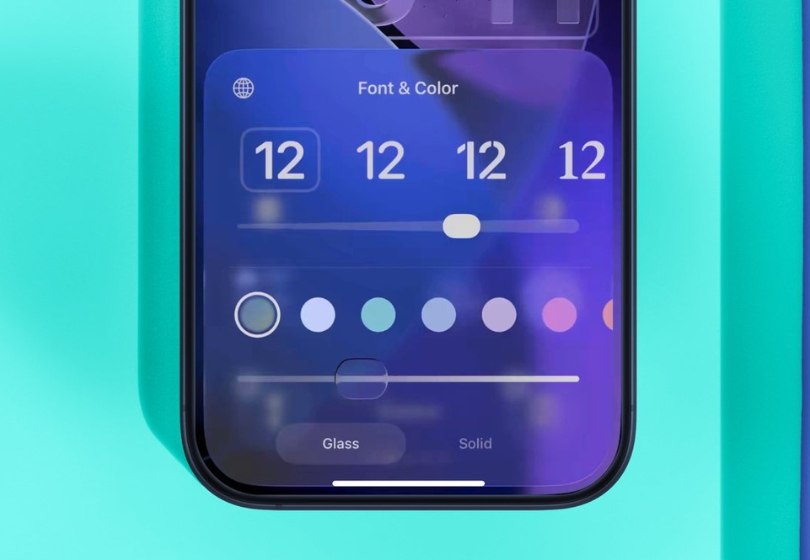
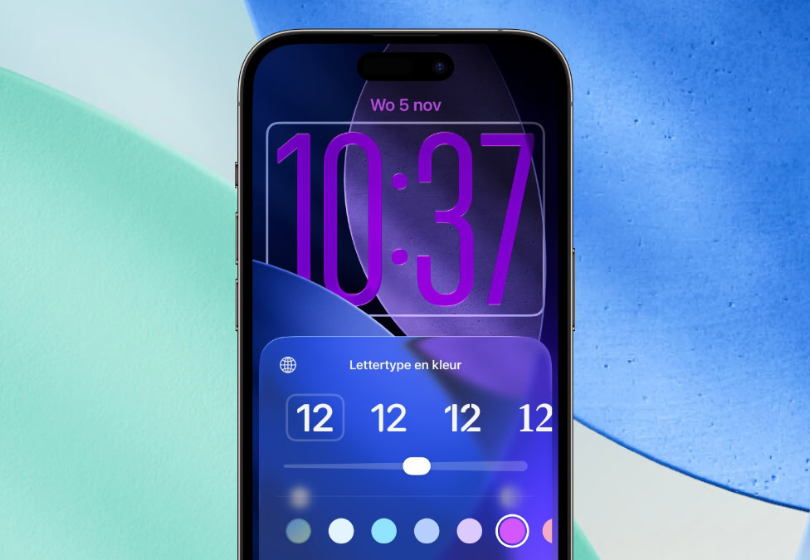
New Lock Screen Upgrade: Adjust Clock Transparency
The standout feature is a new translucency slider for the lock screen clock:
- Adjust how transparent or bold the clock appears
- Works with all available font styles
- Enhances the Liquid Glass visual effect introduced in iOS 26
This gives users more control over aesthetic customization — especially those who prefer a clean or minimalist appearance.
Reminders: Urgent Alarm Alerts
Productivity-focused users will appreciate this:
- Mark a Reminder as Urgent
- The reminder now triggers a system alarm, not just a notification
This is helpful for time-sensitive tasks like meetings, medication reminders, and deadlines.
Sleep Score Changes After User Feedback
Apple has fine-tuned sleep tracking:
- “Excellent” rating is now renamed to “Very high”
- Sleep scoring range recalibrated to better represent realistic sleep patterns
Apple adjusted this based on feedback from users who felt the old scale was too generous.
News App Redesign
Apple continues refining app layouts across iOS, and the News app now includes:
- Quick-access category buttons (Sports, Business, Puzzles, Food, Politics, etc.)
- Cleaner visual layout for faster browsing
Password App Enhancements
A new setting allows users to manage websites where:
- Passwords should not be saved automatically
- Manual control improves privacy and login security
This is especially useful for shared devices or temporary sign-ins.
Podcasts App Improvements
The Podcasts app now includes:
- Auto-generated chapters for episodes
- Related podcast recommendations
- Quick access to links mentioned in episodes
This is a useful quality-of-life improvement for podcast power users.
AirPods Live Translation Expanded
A major Apple Intelligence feature — Live Translation through AirPods — is now available in the EU, meeting Digital Markets Act compliance. This feature lets AirPods provide real-time translation while someone speaks.
Freeform Gains Table Support
The Freeform creative planning app now includes:
- Table insertion and editing
Making the app more useful for collaborative planning sessions, brainstorming, and project mapping.
Enhanced Safety Alerts
Apple is introducing a new emergency feature:
- Alerts for imminent threats (natural disasters, emergencies)
- Option to flash the display for alerts
This complements existing critical alert systems in iOS.
How to Install iOS 26.2 Public Beta 1
You can download the update if you are enrolled in Apple’s public beta program:
- Go to Settings
- Tap General → Software Update
- Enable Beta Updates
- Select iOS 26 Public Beta
Final Thoughts
With Apple Releases iOS 26.2 Public Beta 1, the focus is not on major features — but thoughtful refinements that enhance everyday usability.
- Greater lock screen customization
- Better productivity features with urgent reminders
- App updates that boost practicality
While Apple Intelligence still evolves behind the scenes, iOS 26.2 Beta shows Apple is actively listening to user feedback and improving the user experience week by week.
FAQs
Q1: Who can download iOS 26.2 Public Beta 1?
Anyone enrolled in Apple’s public beta program via Settings.
Q2: Does this update add new Apple Intelligence features?
Not yet — but small improvements suggest AI features are still expanding.
Q3: Is this update stable?
As with all betas, minor bugs may occur. Install only if comfortable with testing software.
Q4: Can I revert back to the stable version?
Yes, but it requires restoring your iPhone through a computer backup.













No Comments